An Azure Storage Account is the basic storage unit in Azure, providing scalable, highly available, and secure storage for various types of data. This storage account supports several storage types, including Blob Storage, File Storage, and Tables.

What Is Encryption Used For
Encryption is a key mechanism for protecting data from unauthorized access. It helps ensure that your data is secure both in transit and at rest, while also meeting various security and regulatory requirements. Azure Storage Account uses encryption to secure data so that only authorized users or applications can read it.
How to Secure an Azure Storage Account
There are several steps and procedures to secure your Azure Storage Account:
1. Using Encryption
Azure Storage Account automatically encrypts all data stored in the storage. This encryption can be managed by Microsoft or the customer.
a) Microsoft Managed Keys (MMK)
This is the default encryption option, where Azure automatically manages the encryption keys. The user does not need to make any additional settings.
b) Customer Managed Keys (CMK)
This allows customers to manage their own encryption keys using Azure Key Vault. You can create, manage, and rotate keys according to your own security requirements.
2. Encryption in Transit
Azure Storage supports data encryption in transit using TLS (Transport Layer Security) protocols. HTTPS is required to ensure encrypted data transfer between clients and Azure Storage services, thereby protecting against man-in-the-middle attacks.
Infrastructure-level encryption is an additional layer of encryption offered by Azure Storage to enhance the security of your data. This feature encrypts data at the infrastructure level, providing double encryption in combination with the default encryption at rest.
Key points about infrastructure-level encryption:
- Double encryption: Infrastructure-level encryption adds a second layer of encryption to your data, further securing it against unauthorized access.
- Automated management: Both layers of encryption (infrastructure-level and default at-rest encryption) are managed by Microsoft, reducing complexity for users.
- Compliance and security: This feature helps meet strict regulatory requirements and enhances data protection by providing multiple layers of encryption.
- Transparent to users: The additional layer of encryption is applied automatically and is transparent to users, meaning no further configuration or management is required on the part of users.
How infrastructure encryption works:
- First layer: Default encryption at rest, which uses either Microsoft Managed Keys (MMK) or Customer Managed Keys (CMK).
- Second layer: Infrastructure encryption adds an additional layer of encryption to already encrypted data using keys managed by Microsoft.
Benefits:
- Enhanced security: By adding an extra layer of encryption, it provides more robust protection against threats.
- Compliance: Helps organizations meet regulatory and legal requirements that mandate multiple layers of encryption.
- Managed by Microsoft: Simplifies the encryption management process, as both layers of encryption are managed by Azure.
Infrastructure-level encryption is particularly useful for organizations with high security and regulatory requirements, ensuring that their data remains protected even if one layer of encryption is compromised.
Deployment
Encryption must be configured in a new storage account. Installation requires Key Vault to be deployed, which secures the storage of private keys used to encrypt the storage.
Architecture:
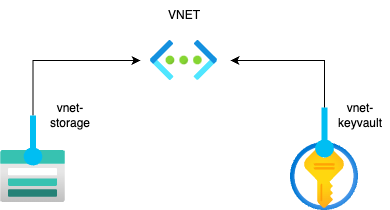
- Generating the keys needed for encryption
.png)
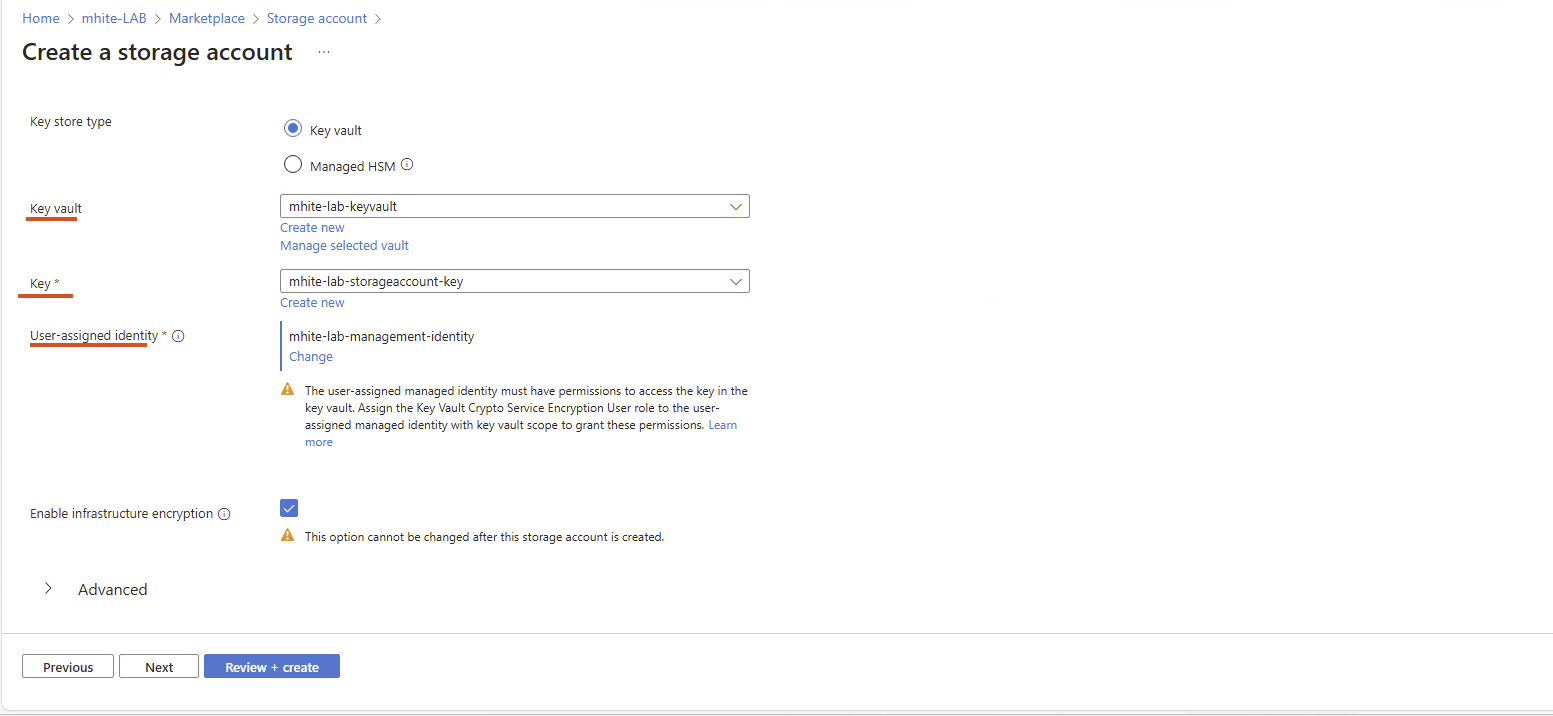
In this section, you must specify the name of the key and the size of the key to be created.
2. Creating keys during storage account setup (this setting cannot be changed later)
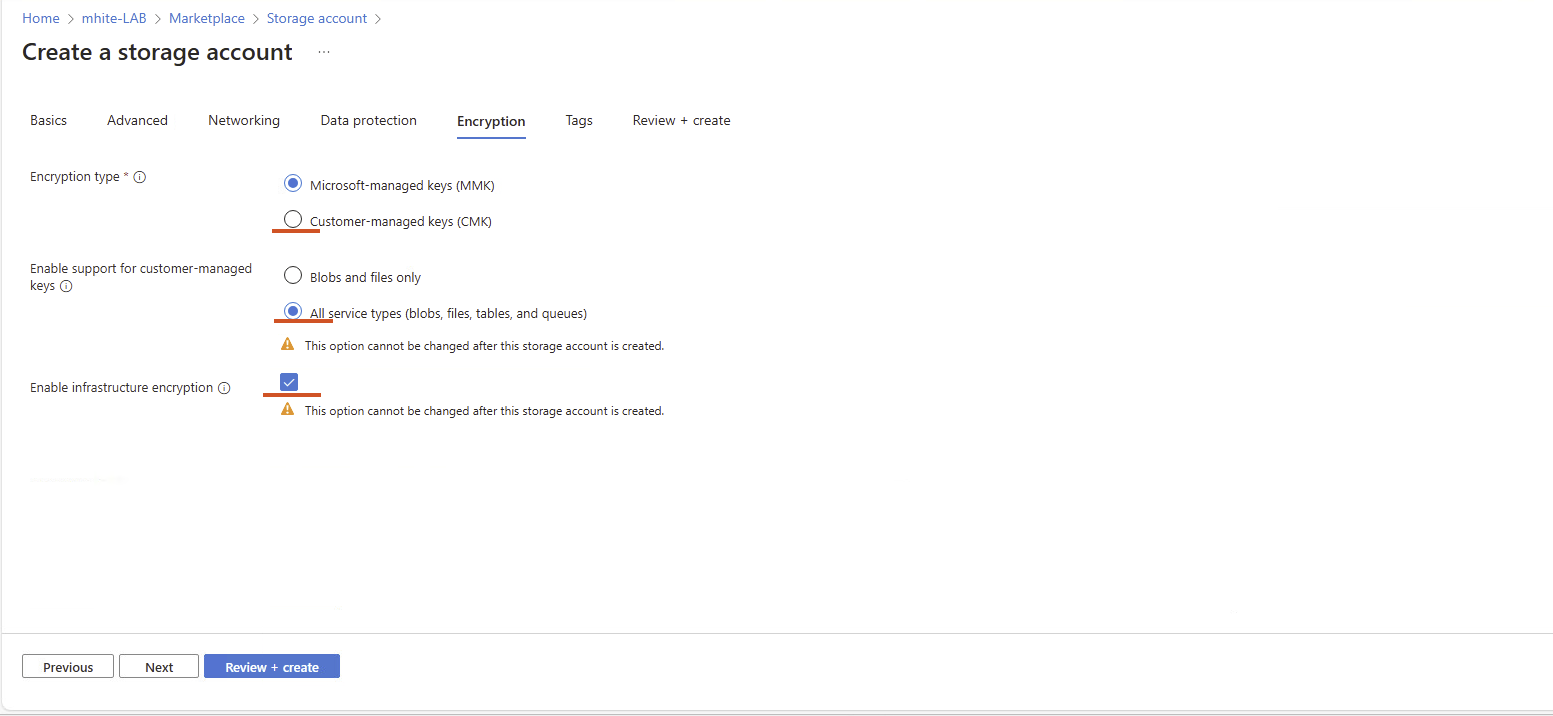
To enable encryption, you must select the key you created in the appropriate Key Vault server.
You can find more technical articles, guides, and IT news on the website: www.virtualall.sk
