Azure Blob Storage is a cloud storage service from Microsoft that allows users to store and manage various types of data in the cloud.

Here is another detailed description of Azure Blob Storage:
- Types:
- Block Blobs: Used for storing large volumes of data. Data is divided into blocks and stored as such, which ensures efficient handling of large files.
- Page Blobs: Designed for storing virtual disks for virtual machines. Data is organized into pages and allows for random access to data.
- Append Blobs: Used for incrementally appending data to the end of a file, which is useful for scenarios where the file size needs to be gradually increased.
- Security:
- Azure Blob Storage provides various mechanisms for securing data, including the ability to set access permissions at the container and blob levels.
- Scalability:
- The service is designed to be scalable and capable of handling large volumes of data. You can easily increase or decrease storage capacity as needed.
- Integration with Other Azure Services:
- Azure Blob Storage is integrated with other services within the Azure ecosystem, enabling the creation of comprehensive cloud applications. For example, it can be easily integrated with data analytics, identity management, or other cloud services.
- Data Backup and Recovery:
- The service provides data backup and recovery capabilities, ensuring that data is protected against loss and can be restored when needed.
- Geo-Replication:
- Data can be replicated across different geographic regions, ensuring high availability and resilience against outages.
Azure Blob Storage is used across various industries for storing, sharing, and managing data in the cloud and is part of Microsoft’s broader ecosystem of cloud services. In the context of Azure services, we can discuss “immutable storage” and “immutable containers” within Azure Blob Storage. These concepts relate to data protection capabilities and ensuring that stored information is not accidentally or intentionally altered. Here is a description of them:
Immutable Storage in Azure Blob Storage:
- Description: Immutable Storage in Azure Blob Storage is a feature that allows you to set an “immutable” state for specified data. This means that once data is stored, it cannot be modified or deleted during a specified validity period.
- Usage: This feature is useful in cases where it is necessary to ensure that data remains unchanged and intact over time, such as for compliance, auditing, or archiving purposes.
The immutable storage feature in Azure allows you to increase the level of security and data integrity in a cloud environment. It prevents accidental or malicious changes to data and provides assurance that the data will remain in its original state for a specified immutability period. These features can be important for organizations that must comply with specific security or regulatory requirements for data management.
Enabling immutable storage in an Azure storage account:
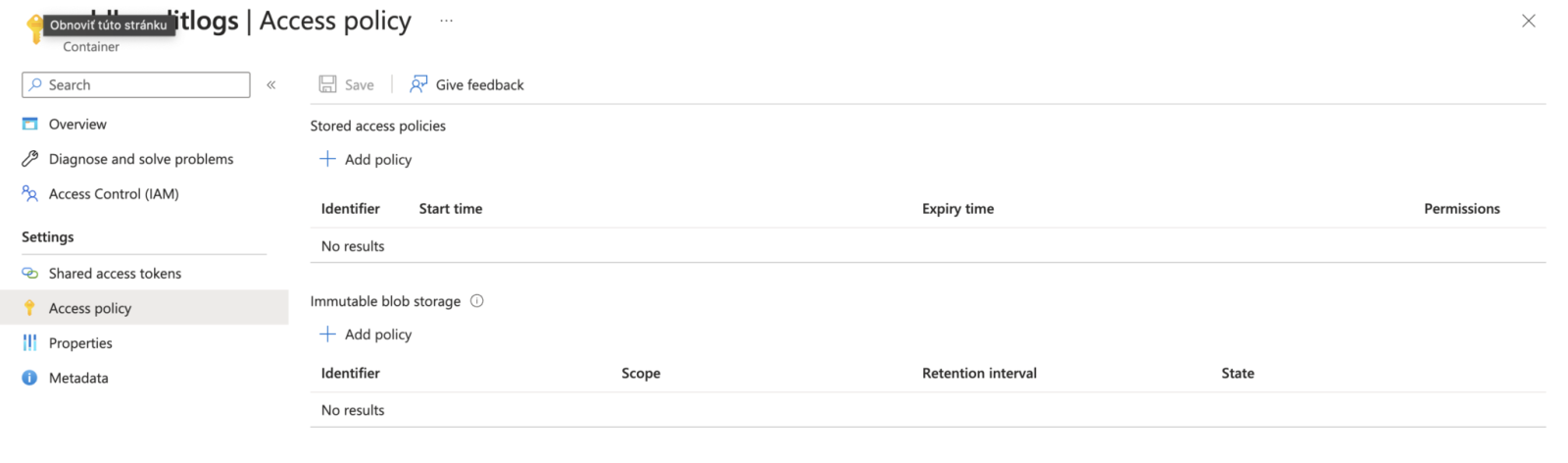
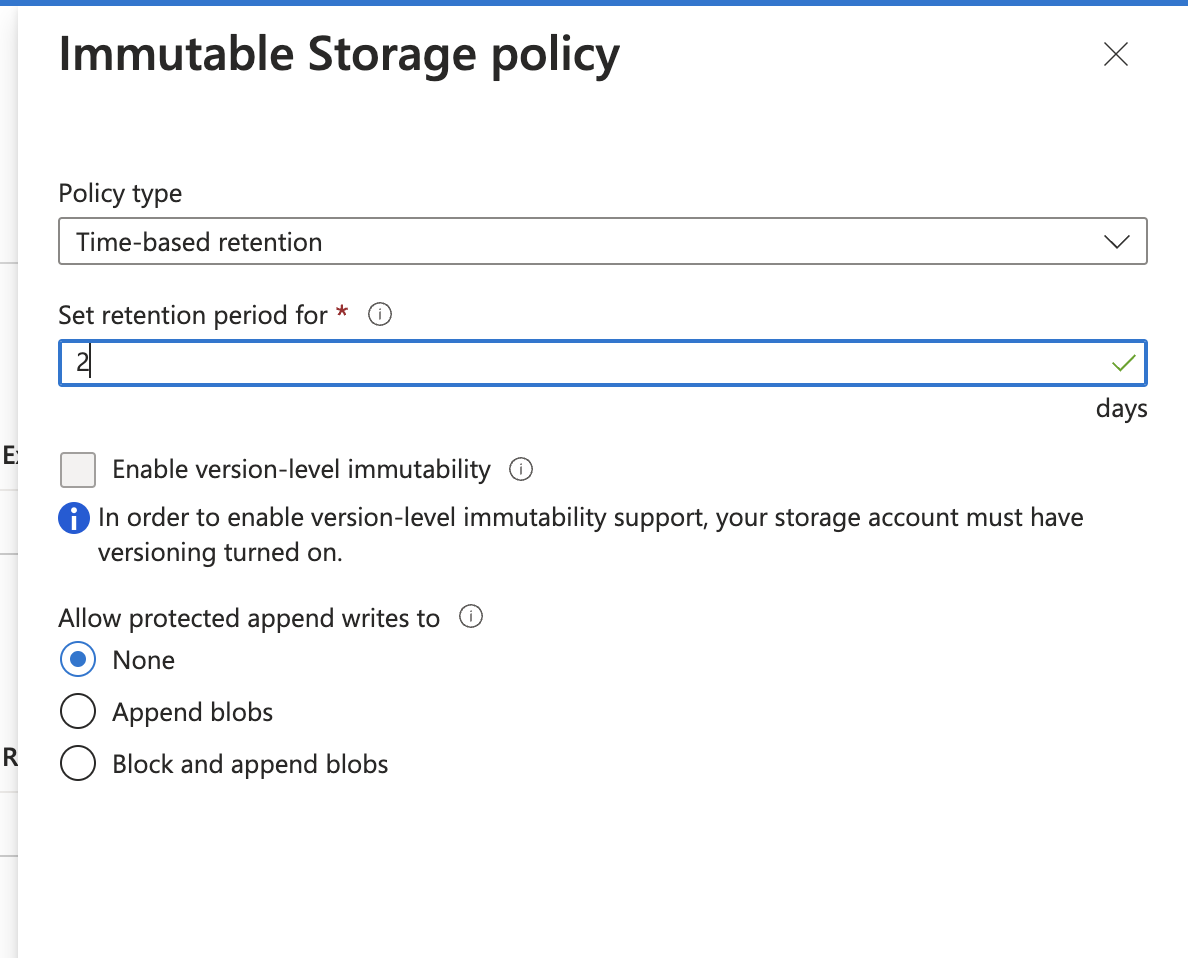
The Immutable Storage policy in Azure Blob Storage is a mechanism that allows you to set an immutable state for data stored in a specified container. This means that once this policy is enabled, the data in the container cannot be modified or deleted during the defined immutability period. This feature provides an additional layer of protection against accidental or intentional data changes.
Here is a description of the options you can configure when using immutable policies in Azure Blob Storage:
- Immutability Period:
- You set the time frame during which the data in the container is immutable. After this period expires, the policy can be updated or removed.
- Versioning and Locking:
- Some implementations of immutable storage policies allow you to create versions of data during the immutability period and lock that data to prevent it from being deleted or modified.
- Prevent Deletion:
- You can enable the option to prevent data deletion during the immutability period. This ensures that data cannot be deleted, even if someone has permission to delete objects in the container.
- Auditing and Verification:
- Immutable storage policy settings can include auditing and verification features that track and log all attempts to modify or delete data during the immutability period.
Configuring immutable policies in Azure Blob Storage is useful in cases where you need to ensure that data remains intact for a specified period of time, for example, for archiving, regulatory compliance, or improved data security.
Find more technical articles, guides, and IT insights on the website: www.virtualall.sk
