Backing up server services is essential for a number of reasons, regardless of whether it is performed in an on-premises data center, in the cloud, or in both environments.
Here are the main reasons why you need to back up your data:
- Data Loss Prevention:
- On-Premises and Cloud: Regardless of where data is stored, there is always a risk of data loss due to various factors, such as hardware failures, human error, software bugs, or even natural disasters. Backups serve as protection against unexpected loss of important information.
- Protection Against Malware and Cyber Threats:
- On-Premises and Cloud: In today’s cyber environment, attacks by malware and various forms of cyber threats are a common threat. Backing up data minimizes the impact of these attacks because it allows systems to be restored to their state prior to infection.
- Ensuring Business Continuity:
- On-Premises and Cloud: Backup is a key element of business continuity. In the event of an outage, accident, or other crisis, it enables the rapid recovery of critical systems and data, minimizes operational disruptions, and safeguards business continuity.
- Legal Requirements and Compliance:
- On-Premises and Cloud: Many industries and regulatory bodies require companies to comply with certain standards regarding data backup and recovery. Backup is therefore an essential step in meeting legal requirements and regulatory standards.
- Protection Against Hardware Failures:
- On-Premises and Cloud: Hardware failures can lead to permanent or temporary data loss. Backups allow data to be restored on different hardware and minimize losses in the event of a physical device failure.
- Disaster Recovery:
- On-Premises and Cloud: In the event of natural disasters or other emergencies that could result in the complete loss of on-premises infrastructure, cloud backup enables the recovery of critical data at alternative locations and minimizes the impact of the disaster on business operations.
- Protection Against Human Error:
- On-Premises and Cloud: Human errors, such as accidentally deleting data or overwriting critical files, can lead to irreversible data loss. Regular backup and backup management enable data recovery in the event of human error.
- Support for Archiving and Historical Data:
- On-Premises and Cloud: Backups serve not only to restore current data but also to archive historical information. This capability can be important for audits, historical change tracking, or meeting long-term retention requirements.
Overall, backup is a key tool for protecting data and ensuring its availability in various situations. It ensures system recovery, minimizes losses, and provides support for critical areas such as security, compliance, and business continuity. Without a high-quality backup solution, companies would face an increased risk of data loss and potentially serious consequences for their operations.
Backup plays a key role in protecting against ransomware attacks, which represent one of the most serious cyber threats today. Ransomware is a type of malware that encrypts data on a target device or network and demands a ransom from the victim to restore access to that data. Backups offer several advantages in protecting against these attacks:
- Data Recovery Without Paying a Ransom:
- Backups allow data to be restored from previous backups without the need to pay a ransom. When data is backed up regularly, an organization can restore affected files from the backup copies, thereby minimizing the financial burden and promoting a zero-tolerance policy toward paying ransoms.
- Rapid System and Data Recovery:
- An effective backup process enables rapid recovery of systems and data following a ransomware attack. This minimizes the impact of the attack on normal operations, and recovery can be completed in a short time.
- Prevention of Important Information Loss:
- Backup serves as a preventive measure that minimizes the loss of important information. An organization can be confident that, in the event of a ransomware attack, it will be able to restore data from backups and preserve critical information.
- Secure Data Repository:
- A properly implemented backup solution allows for the storage of data copies in secure, isolated repositories that are separate from regular production systems. This minimizes the risk that ransomware could also affect the backups.
- Protection Against Ransomware Spread:
- If an organization maintains a backup history, it can prevent ransomware from spreading to backups. With the standard practice of storing multiple copies, the backed-up system can be restored to its pre-attack state.
- Automated Management and Monitoring:
- Modern backup systems offer automated management and monitoring of backups. These systems can detect unusual activity or changes in data, which helps identify ransomware attacks in their early stages.
- Prevention Through Historical Data:
- Backup history can also serve as a preventive measure against future ransomware attacks. By analyzing previous incidents and their progression, an organization can develop better prevention strategies and faster response plans.
Overall, backup is an essential component of cybersecurity and plays a crucial role in protecting against ransomware attacks. The ability to quickly and effectively restore data from backed-up systems is key to minimizing damage and ensuring business continuity in the event that an organization is hit by ransomware.
Azure Cloud Security
The Azure cloud provides robust security mechanisms and measures to minimize the risk of data loss, but it is important to recognize that no cloud provider can guarantee complete security against all threats. Azure implements a number of security features and practices to protect data, including:
- Data Encryption:
- Azure automatically provides encryption for data in transit and at rest. This includes encryption of data in network transmissions (e.g., HTTPS/TLS) as well as in storage such as disks, databases, and object storage.
- Identity and Access Management (IAM):
- With Azure Active Directory and role-based access control (RBAC), you can effectively manage access to resources in the cloud. This ensures that only authorized users have access to sensitive data.
- Firewalls and Network Security Groups:
- Azure provides options to configure network firewalls and Network Security Groups to restrict access to virtual networks and services.
- Monitoring and Logging:
- Azure offers tools for monitoring and logging activities, which means you can track data access, detect unusual activity, and respond to potential threats.
- Azure Security Center:
- This tool provides advanced security analytics, recommendations for security settings, and monitoring of the security health of your resources in Azure.
- Azure Backup and Azure Site Recovery:
- Azure offers tools for data backup and system recovery that can help protect against data loss in the event of an outage, error, or disaster.
- Azure Information Protection:
- With this service, you can classify and protect sensitive data at the document level. You can define protection policies and track access to this data.
- Regular Auditing:
- Azure enables regular data auditing, which can be useful for tracking changes and detecting unauthorized activities.
Although Azure provides these security features, it is the customer’s responsibility to implement additional measures and procedures to protect their own data. This includes regular data backup, access rights management, encryption, and the implementation of security policies within their own legal and regulatory framework. Cloud security should be a holistic approach where customers and cloud providers collaborate to achieve an optimal level of security.
How can you back up your data?
In the Azure cloud, you can back up various services and data stores. Azure Backup is often used to back up virtual machines, databases, files, and other resources. Through the Azure Portal or the command line, you can easily set up backup schedules, define data retention, and monitor the status of backup operations. Integrated tools such as Azure Site Recovery also provide recovery options. A second backup option is to use third-party services such as Veeam. Veeam Backup for Azure is a third-party application that provides comprehensive backup solutions for the Azure cloud. This application allows you to back up virtual machines, databases, files, and other Azure resources. With integrated backup management, scheduling, and monitoring, Veeam provides users with effective tools for protecting data in Azure.
What can be backed up?
In the Azure cloud, a wide range of services and resources can be backed up, including:
- Virtual Machines:
- Backing up operating systems, applications, and data in virtual machines.
- Databases:
- Securing critical data in Azure SQL databases or other database services.
- Files and Object Storage:
- Backing up file systems, files, and data in object storage.
- Web Apps (App Services):
- Protection of code, configurations, and data in Azure Web Apps.
- Identity and Access (Azure Active Directory):
- Backing up identity configurations and data, including user data and groups.
- Azure Blob Storage:
- Securing data in Azure Blob Storage, including large volumes of unstructured data.
- Virtual Networks and Network Devices:
- Backing up configurations for networks, firewalls, and other network resources.
- IoT Hub and Data from IoT Devices:
- Protecting data from IoT Hub and data from connected IoT devices.
- Azure Kubernetes Service (AKS):
- Backing up configurations and data in AKS container clusters.
- Azure Functions:
- Backing up functions and code in the Azure Functions serverless environment.
Integration with tools such as Azure Backup and third-party applications, such as Veeam Backup for Azure, allows users to tailor their backup strategies to specific requirements and ensure the recovery of critical information when needed.
Backing up Azure SQL Databases
Backing up SQL Databases to Azure Disk:
Benefits:
- Restore Speed:
- Backing up to a local Azure Disk can ensure fast and efficient database recovery when restoration is needed.
- Integration with Azure:
- Allows you to integrate backups with other Azure services, such as Azure Backup, which adds additional data management and protection capabilities.
- Lower Latency:
- When backing up to a local disk within Azure, latency can be lower, which can be beneficial for fast recovery and access to backed-up data.
- Simple Implementation:
- The process of backing up to an Azure Disk can be relatively simple and easy to configure, making management easier.
Disadvantages:
- Limited Resilience to Critical Events:
- In the event of an outage or disaster in the Azure region where the disk is located, data loss may occur if backups are not replicated to another region.
- Potentially Higher Costs:
- Depending on the type of disks used and the volume of data, the cost of a local Azure Disk may be higher compared to other backup methods.
Backing Up Data Externally to On-Premises Storage:
Advantages:
- Data Sovereignty:
- Ensures that the organization has complete control over its backed-up data, which can be critical for compliance with data protection laws and policies.
- Greater Resilience to Critical Events:
- External backups to on-premises storage can be more resilient to events that could affect cloud regions.
- Flexibility and Control:
- The organization has greater flexibility in choosing storage and using its own resources, which allows for better control over the entire backup process.
Disadvantages:
- Risk of Availability Loss:
- On-premises storage may be more prone to outages and availability losses compared to cloud storage solutions with higher availability.
- More Manual Management:
- It requires more manual management and maintenance, including monitoring and securing backed-up data.
- Management Costs:
- It can be more expensive to manage and maintain on-premises storage compared to using cloud backup services.
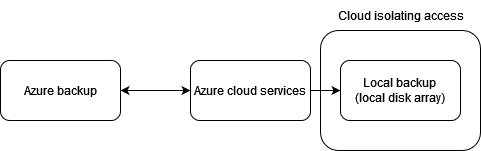
Overall, the choice between backing up to Azure Disk or external on-premises storage depends on the organization’s specific needs and requirements, as well as the balance between various factors such as availability, cost, and control over data. The recommended approach is to use a combination of both backup methods, where data is backed up to the cloud environment and also copied to local storage that the cloud device cannot access. This approach helps prevent potential attacks by encrypting the secondary backup as well.
Využitie azure SQL backup
Azure SQL Database automatic backups are a built-in feature that provides automated and continuous protection for your data. Key aspects of Azure SQL Database automatic backups include:
- Automated Schedule:
- Azure SQL Database automatically performs regular backups without the need for manual intervention. The service manages the backup schedule, frequency, and retention policies.
- Point-in-Time Recovery:
- Automatic backups enable point-in-time recovery, allowing you to restore the database to a specific point in time within the retention period. This feature is valuable for recovering from accidental data modifications or errors.
- Retention Policies:
- You can set retention policies that determine how long backup data should be retained. Azure SQL Database allows you to set retention periods based on your business and security requirements.
- Geo-recovery:
- Azure SQL Database provides geo-recovery capabilities, which allow you to restore a database to a different location for disaster recovery or to meet data residency requirements. This feature enhances the overall resilience of the database.
- Long-Term Data Retention:
- Extended backup retention allows you to retain backups for an extended period, beyond standard retention policies. This is useful for meeting regulatory requirements or internal data archiving policies.
- Security and Compliance:
- Backups are securely stored, and access to them is controlled to maintain data confidentiality and integrity. This complies with security and compliance standards.
- Point-in-Time Recovery:
- In addition to point-in-time recovery, you can also perform point-in-time restore operations to restore the database to a specific state and ensure data consistency.
- Continuous Monitoring and Alerts:
- Azure SQL Database provides continuous backup monitoring, and you can set up alerts to be notified of any issues or errors in the backup process.
- Efficiency and Cost Management:
- The automated backup process is designed to be efficient, and you only pay for the storage space used by backups. This helps with effective cost management.
These automatic backup features in Azure SQL Database contribute to data resilience, simplify database management, and ensure that your data is protected against potential loss or corruption.
View SQL backup functionality:
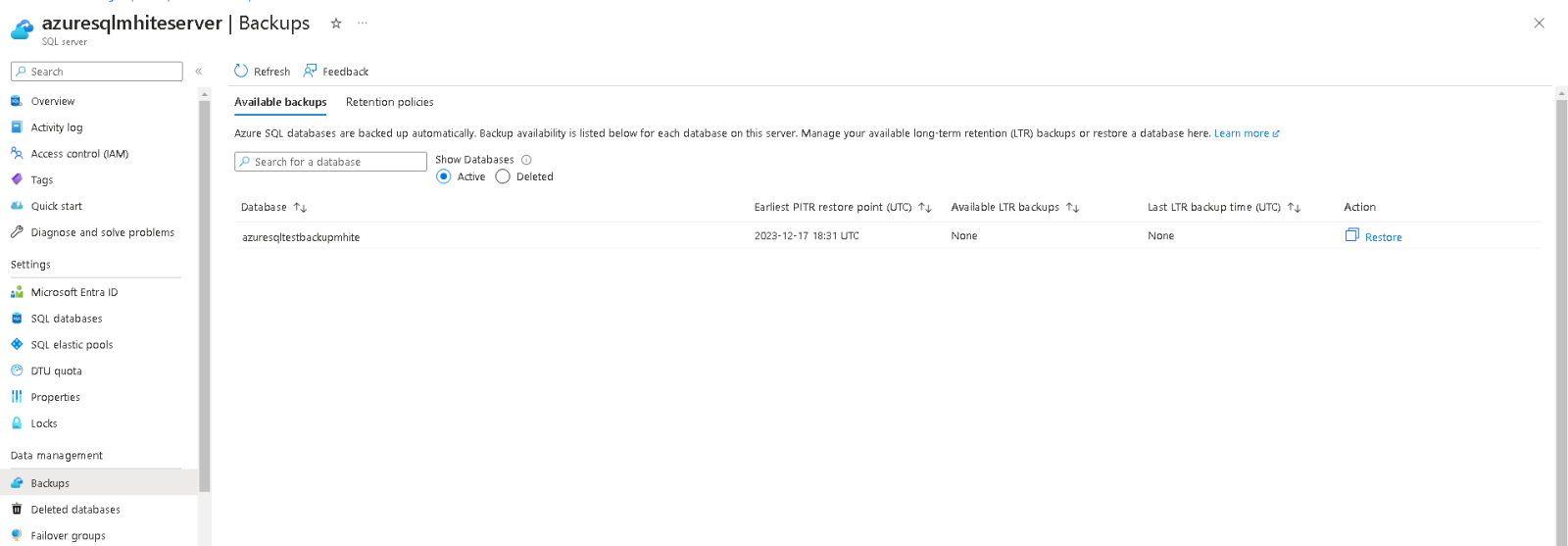
Revision of the deposit refund policy:

Default backup policies specify the following:
- The database is backed up once a day
- Backups are retained for 7 days
Using a backup script with the Ubuntu operating system
Creating a custom script for database backup offers several advantages, including:
- Flexibility:
- A custom script allows for complete flexibility and customization of backup processes to precisely match the organization’s needs and preferences.
- Precise Configuration:
- The ability to precisely configure backup parameters, such as frequency, retention, formats, and location, enables optimal backup management.
- Automation:
- The script can be easily integrated into a task scheduler or other automation tools, ensuring that backup operations are performed regularly and systematically.
- Security as Needed:
- The ability to implement custom security mechanisms within the script ensures that access to backups and their contents is controlled and protected.
- Rapid Error Diagnosis:
- In the event of errors, it is easier to diagnose issues using a custom script, allowing for a quick response and resolution of any problems with backup operations.
- Specialized Scenarios:
- A custom script allows backup processes to be tailored to specific scenarios or organizational requirements, which can be particularly useful in industries with specific needs.
- Lower Costs:
- Implementing a custom script can eliminate the need to invest in expensive commercial solutions, allowing the organization to effectively manage backup costs.
- Precise Control Over the Process:
- A custom script provides precise control over every step of the backup process, enabling better management and monitoring.
- Adaptation to Data Structure:
- For organizations with specific data structure requirements, a custom script can offer greater flexibility for customizing and manipulating data before export.
- Rapid Implementation of New Features:
- An organization can quickly add new functionality or customize the script to meet its needs without waiting for updates to commercial tools.
Although creating a custom script requires knowledge and resources, it can be an effective option for organizations that need to precisely define their backup processes according to specific requirements.
Installing the necessary backup tools
wget https://download.microsoft.com/download/e/b/8/eb8fd935-e9c6-497f-9d71-1af3dc301e4e/sqlpackage-linux-x64-en-162.1.167.1.zip
apt install -y unzip
unzip sqlpackage-linux-x64-en-162.1.167.1.zip
chmod +X sqlpackage
The backup consists of creating an export of the current databases from the Azure SQL server
./sqlpackage /a:Export /ssn:tcp:azuresqlmhiteserver.database.windows.net,1433 /su:matoh12 /sp:"mypassword" /sdn:azuresqltestbackupmhite /tf:backup.bacpac
- /ssn – defining the Azure SQL Server address
- /a – defining the method to be performed on the database
- /su – defining the user with permissions to log in to the database
- /sp – defining the access password
- /sdn – defining the name of the database being backed up
- /tf – the name of the file where the backup will be saved
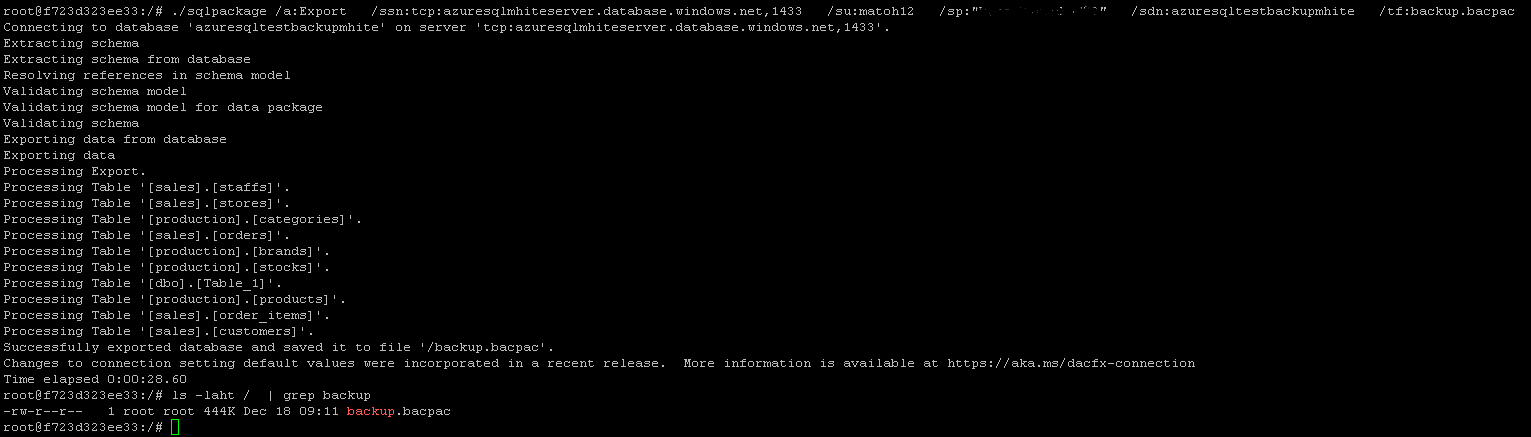
Backups can be automated using CRON to ensure the desired retention period
Záloha pomocou Veeam backup for azure v6
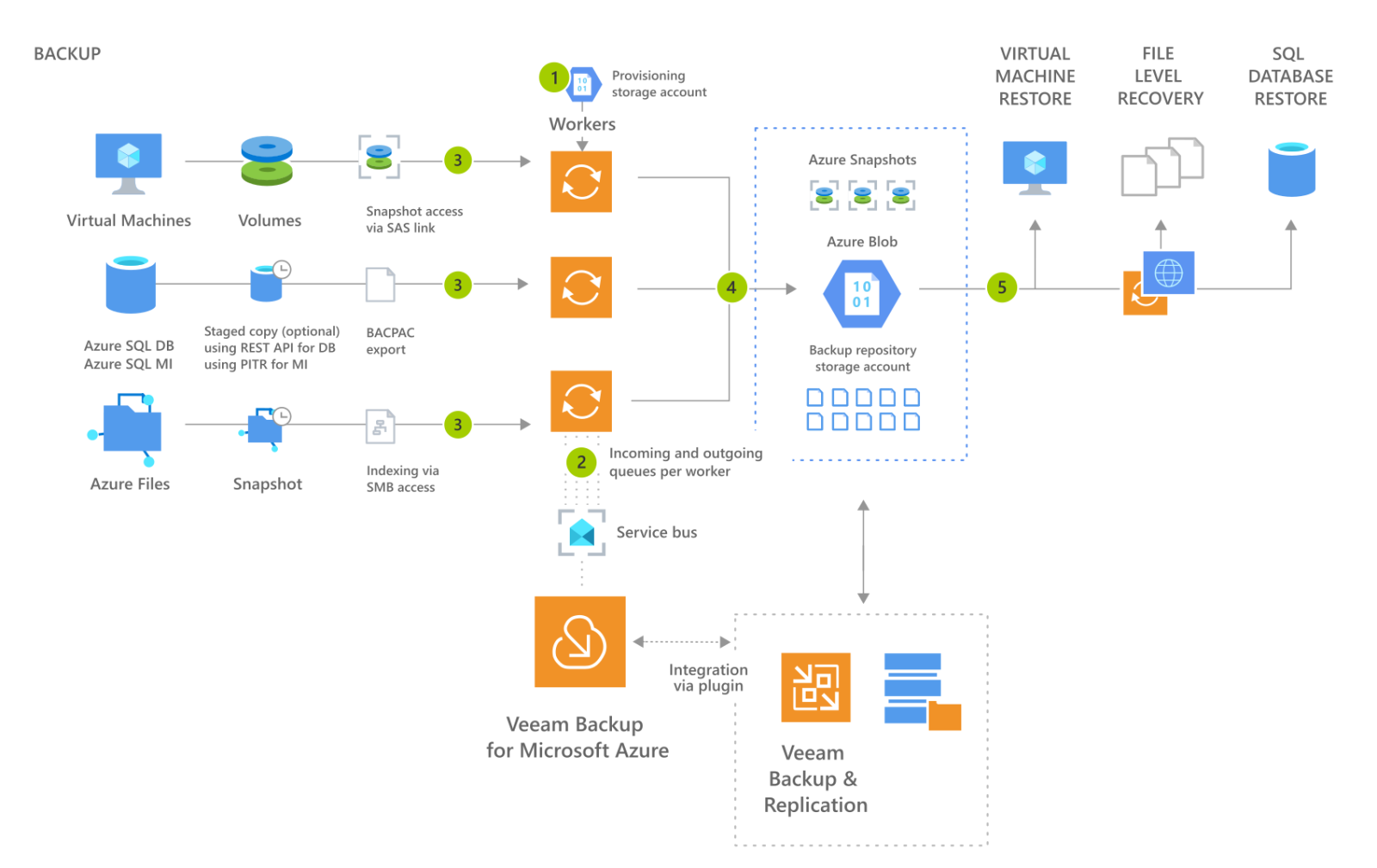
Backing up with Veeam Backup for Azure offers several benefits:
Easy Implementation:
- Veeam Backup for Azure offers easy implementation with an intuitive user interface, simplifying the backup and recovery process.
- Centralized Management:
- It provides centralized backup management for multiple Azure environments, enabling efficient administration.
- Flexibility of Backup Schedules:
- It allows you to customize backup schedules according to specific requirements and timelines, increasing flexibility.
- Integration with the Veeam Platform:
- Veeam Backup for Azure is part of Veeam’s larger platform, enabling integrated management and ensuring a consistent experience with other Veeam solutions.
- Support for Multiple Backup Types:
- Supports various backup types, including full, incremental, and differential backups, enabling optimized storage utilization.
- Fast Recovery and Disaster Recovery:
- Provides fast recovery and disaster recovery, enabling the restoration of systems and data in a short time.
- Encryption and Data Security:
- Secures data using encryption and offers key management options for an additional layer of security.
- Backup of Various Azure Services:
- Supports backup of various Azure services, including virtual machines, databases, file systems, and more, enabling comprehensive protection.
- Automatic Backup Creation:
- Veeam automatically creates backup copies in Azure storage, eliminating the need for manual steps and ensuring consistent backups.
- Monitoring and Reporting:
- Provides tools for backup monitoring and performance management, enabling the tracking of backup operation status and the identification of potential issues.
Veeam Backup for Azure is a comprehensive solution that enables organizations to efficiently and securely back up and restore data in the Azure cloud, helping to protect against data loss and enhancing the ability to quickly recover when needed.
Backing up an Azure SQL database using Veeam Backup for Azure
Defining the source database for Veeam Backup
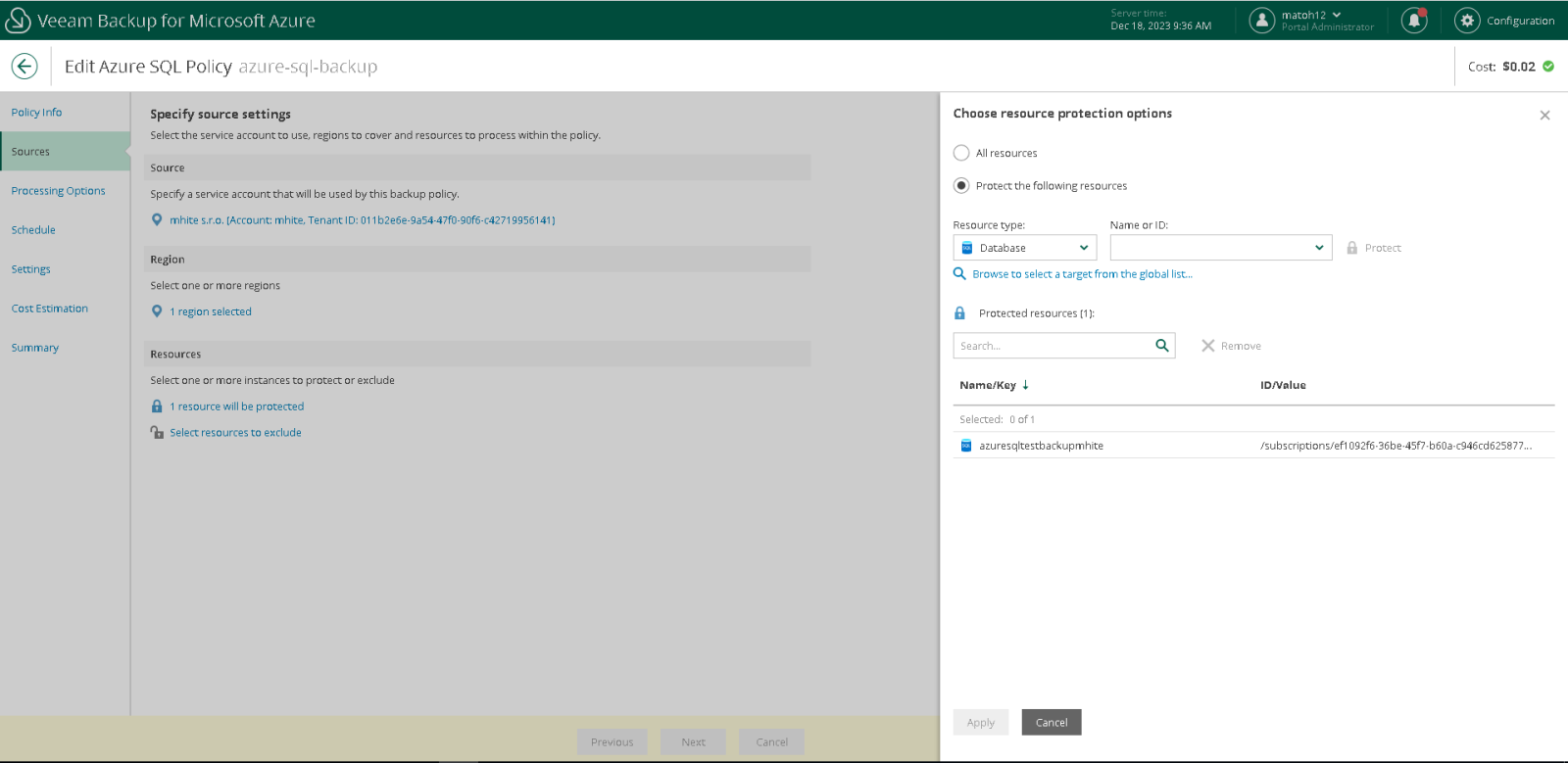
Defining the time when the backup should occur:
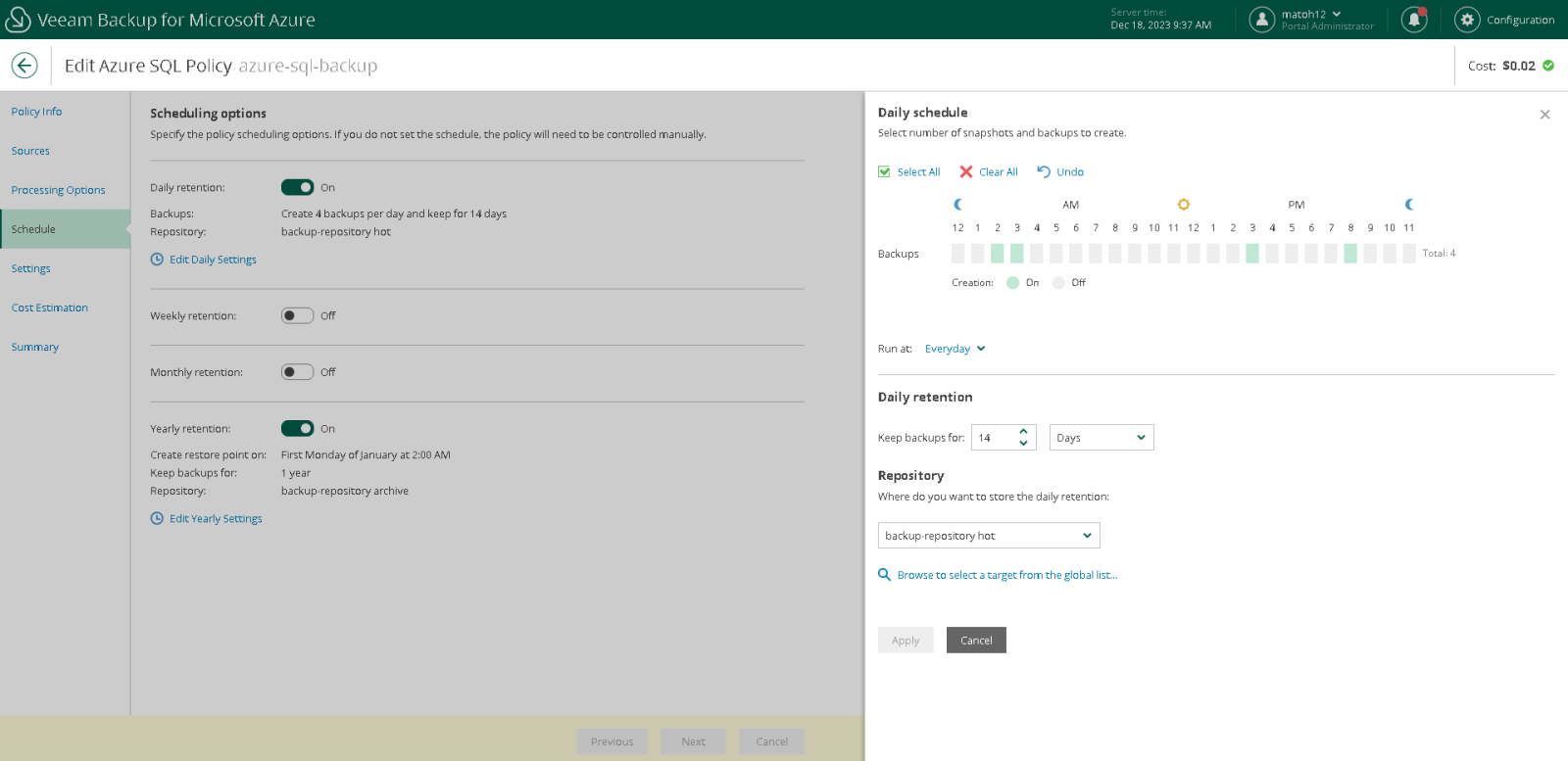
Calculation of the estimated price for a backup of the database:
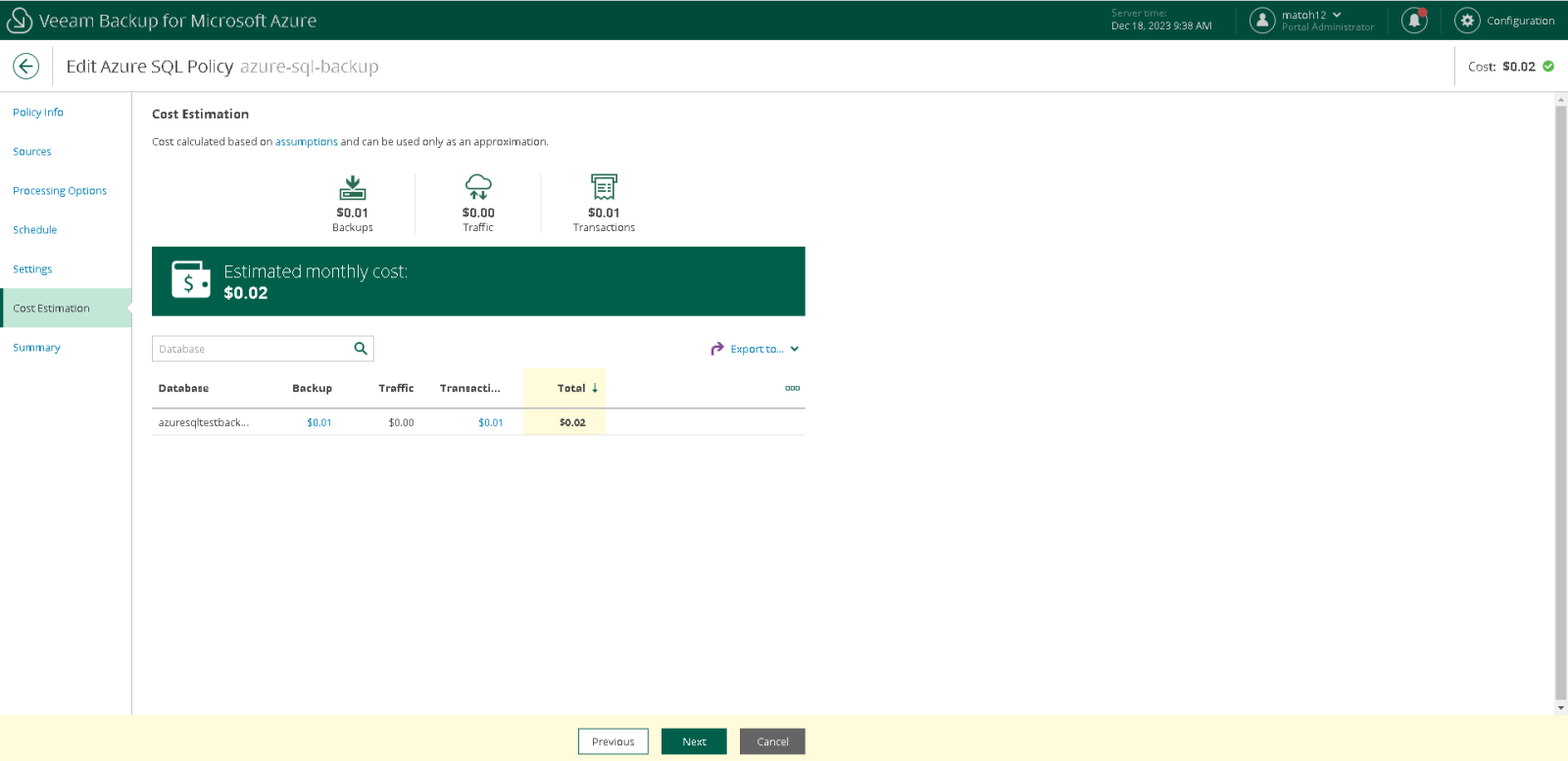
You can select a restore point for the restore
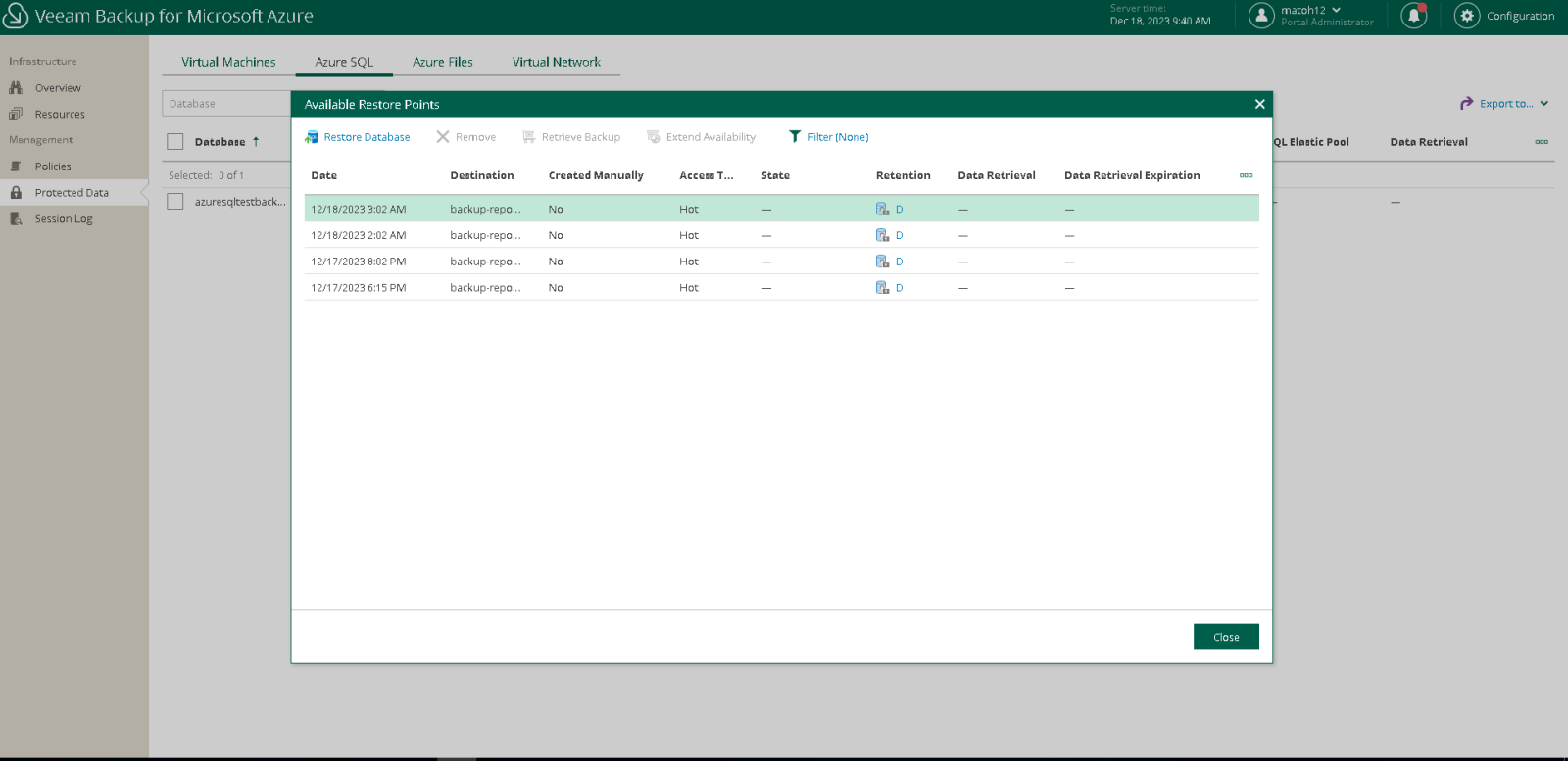
The advantages of this backup method lie in backing up the database to an external storage adapter. When using a separate subscription, the backups are isolated, which eliminates the possibility of an attacker destroying them.
Evaluation
Backing up an Azure SQL database using different tools offers various advantages and limitations. Azure Backup provides simple integration and automatic retention management, with an emphasis on security and monitoring via the Azure Portal. Conversely, a custom script allows for complete flexibility but requires a more complex implementation and configuration. Veeam Backup for Azure combines centralized management and integration with extensive functionality, but may involve licensing costs and dependence on an external platform. The choice between these options depends on the organization’s specific needs, priorities regarding flexibility and costs, as well as preferences regarding integration and management.
Estimated backup operating costs:
| Veeam Backup for Azure | Azure Backup | Script Backup | |
|---|---|---|---|
| VM – ubuntu | 15.11/mesiac | 0 | 7.59/mesiac |
| DISK – 30 GB | 4.81/mesiac | 0 | 1.54/mesiac |
| IP – IPv4 | 2.60/mesiac | 0 | 2.60/mesiac |
| Azure Storage | 0.057/GB | 5 + 0.0224/GB pri <50GB | 0.057/GB |
| Licencia | 0* | 0 | 0 |
Sources:
- https://azure.microsoft.com/en-us/pricing/details/managed-disks/
- https://azure.microsoft.com/en-us/pricing/details/ip-addresses/
- https://azure.microsoft.com/en-us/pricing/details/storage/files/
- https://azure.microsoft.com/en-us/pricing/details/backup/
- https://azure.microsoft.com/en-us/pricing/details/virtual-machines/linux/
You can find more technical articles, guides, and IT news on the website: www.virtualall.sk
