Why a flat corporate network means that a single infected computer can threaten the entire company. Real-world cases from Maersk and Norsk Hydro, and a step-by-step guide to implementing VLAN segmentation.
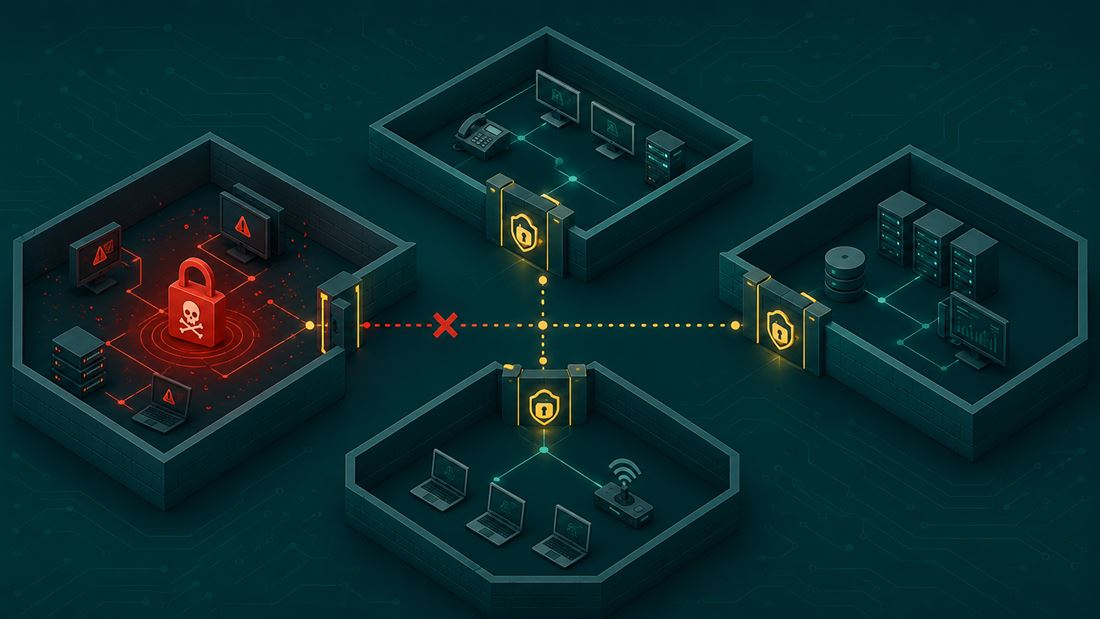
Why a Single Infected Computer Can Bring Down an Entire Company
When we talk about ransomware, most people picture a single encrypted computer and a ransom note on the screen. The reality in a corporate environment is much worse. The real problem isn’t the initial infection—it’s what happens in the minutes and hours that follow, as the attacker spreads from a single compromised device to dozens or thousands of others.
This process is called lateral movement, and in companies with a flat network—that is, a network where all devices can communicate freely with one another—it is practically unstoppable.
What Does “Flat Network” Mean?
A flat network is one in which there is no logical separation between the individual parts of a company’s infrastructure. An accountant’s laptop is on the same network as the database server, the printer, the surveillance system, and the domain controller. If an attacker takes control of a single device—often all it takes is one click on a phishing email—they have virtually free rein to access anything else.
Most ransomware attacks today do not work by having the malicious code “spread on its own.” After the initial breach, the attacker moves through the network manually or semi-automatically: stealing login credentials from memory, testing them on neighboring devices, and gradually gaining higher and higher privileges until they reach the Active Directory domain controller. From that point on, the attacker has virtually unlimited control over the entire corporate network, and encryption is triggered all at once, simultaneously on thousands of devices.
Real-Life Examples
Maersk and NotPetya (2017)
The most frequently cited case in the entire field of cybersecurity. The attack began on a single computer at a branch office in Odessa, Ukraine, where infected accounting software had been installed. Maersk operated on a global flat network connecting 600 locations worldwide that trusted one another—and that was enough for the malicious code to spread throughout the entire organization within hours; according to some sources, even within the first seven minutes.
The result: the company had to reinstall more than 4,000 servers, 45,000 computers, and 2,500 applications. It was saved only by a stroke of luck—the sole Active Directory domain controller at the branch office in Ghana was disconnected from the network during the attack due to a power outage, making it the only undamaged resource from which the entire corporate domain could be restored. Without this stroke of luck, Maersk would likely have lost its entire corporate identity and access credentials. Financial losses are estimated at $250–300 million.
Norsk Hydro and LockerGoga (2019)
The attack began with a simple phishing email opened by an employee. Because most of the company’s servers were under the same domain without significant segmentation, the ransomware was able to spread much faster than would have been possible in a network divided into separately administered units. Approximately 35,000 employees in 40 countrieswere affected, and recovery costs reached around 71 million dollars.
Interestingly, unlike many companies, Norsk Hydro had functional and intact backups—so it did not have to pay the ransom. Nevertheless, its lack of segmentation allowed the attacker to gain access to almost any part of the network. This case clearly demonstrates that backups alone are no substitute for segmentation—they address the consequences of an attack, not its scope.
How Segmentation (VLAN) Solves This Problem
VLAN (Virtual Local Area Network) allows a single physical network to be logically divided into multiple separate segments, with communication between them permitted only where explicitly allowed—typically through a firewall or router with defined rules.
In practice, this means that instead of one large network where “everything sees everything,” the following are created, for example:
- a separate segment for employees’ regular workstations,
- a separate segment for servers and databases,
- a separate segment for printers, cameras, and IoT devices,
- a separate segment for guest Wi-Fi access,
- a separate segment for critical systems (production, OT, domain controllers).
If ransomware infects a single workstation in the employee segment, it does not automatically have access to the database server or the domain controller—unless the firewall between segments explicitly allows it. An attack that would affect the entire company within an hour in a flat network can be contained to a single department in a segmented network.
Recommended Procedure for Implementing Segmentation
Segmentation is not implemented in a single weekend-long effort—a company that tries to do so will usually disrupt functioning processes before it improves security. The best practice involves four phases.
1. Mapping data flows
Before anything is segmented, you need to know exactly what is actually communicating with what. This is the most time-consuming but most important phase—most failed segmentation projects fall apart right here because companies underestimate how many “hidden” dependencies exist (for example, an accounting system that accesses a third-party server once a month, or a printer that communicates with cloud-based management).
In practice, this means:
- Inventory of all devices on the network (workstations, servers, printers, cameras, IoT devices, network components).
- Monitoring network traffic over a sufficiently long period (typically 2–4 weeks) to capture even periodic data flows (monthly backups, quarterly reports).
- Tools such as NetFlow/sFlow analysis, Wireshark for smaller networks, or more advanced network discovery tools for larger infrastructures.
- Identification of critical assets—where sensitive data, domain controllers, and production systems are located—and who or what actually needs access to them.
The output of this phase should be a simple map: “Device/group A communicates with device/group B on port X, for reason Y.”
2. Defining Zones
Based on the flow map, logical zones are designed according to function and sensitivity, not according to the company’s organizational structure. Typical divisions:
- Workstation Zone – employees’ laptops and computers.
- Server/Data Zone – databases, file servers, application servers.
- Identity Management Zone—domain controllers, Active Directory, DNS.
- Peripherals and IoT Zone—printers, cameras, access control systems, smart devices.
- Guest Zone—Wi-Fi for visitors, with no access to the internal network.
- DMZ (Demilitarized Zone) – publicly accessible services (web server, email gateway), separated from the internal network.
- OT/Production Zone (if applicable) – production lines, SCADA systems, completely isolated from the regular IT network.
For each zone, a precise rule is then defined: who is allowed to communicate with whom, on which port, and in which direction. The basic principle is “default deny”—everything is prohibited unless explicitly permitted, not the other way around.
Open and Closed Ports: The Second Layer of Defense
Network segmentation determines which zones can communicate with each other. Port control determines how they do so—it is precisely this layer that can stop an attacker even if they manage to breach the boundary between zones.
Why this is important. Every service running on a device—file server, database, remote management—communicates through a specific port. If a port is left open without restriction, it means that anyone in that network segment can connect to that service, regardless of whether they actually need to.
Ransomware and attackers engaged in lateral movement specifically target such unnecessarily open ports. A typical example is port 445 (SMB), which served as the entry point for the EternalBlue exploit used in both WannaCry and NotPetya. Other frequently exploited ports include:
- 3389 (RDP) – remote desktop; if it is open to the internet or freely accessible across the entire internal network, it is one of the most common entry points for ransomware groups.
- 445 (SMB) – file sharing; historically the most exploited protocol for lateral movement.
- 22 (SSH) – remote server administration; a problem arises if it is accessible from the entire network and not just from dedicated administrative workstations.
- 23 (Telnet) – an unsecured, unencrypted protocol; it should hardly be active anywhere today, yet it is still found on older IoT and network devices.
- 135, 139 (RPC/NetBIOS) – frequently exploited in techniques such as Pass-the-Hash.
The “default deny” principle at the port level. The same principle that applies to zones also applies here: everything is closed unless explicitly necessary and permitted. In practice, this means:
- On the firewall between zones, allow only specific ports necessary for specific, documented communication (for example, port 443 between the workstation zone and the web server in the DMZ), not an entire range of ports “just to be safe.”
- Restrict administrative ports (RDP, SSH) to communication only from a dedicated administrator workstation or via VPN; never allow unrestricted access from the entire internal network.
- On servers and end devices, disable or close all ports and services that are not actually in use—every unused port that is running is an unnecessary opportunity for an attacker.
- Regularly scan your own network (for example, using tools like Nmap) from an attacker’s perspective—determine what is actually visible and accessible, not what the company thinks is configured.
The connection to segmentation. Segmentation without port control is like locking the main door to a building but leaving all the doors to individual offices open. An attacker who gains access to one zone cannot move freely between zones, but within that same zone, they can still exploit an open port 445 or 3389 to reach another device. It is precisely the combination of “properly defined zones” and “only the necessary ports between and within them” that will effectively limit the scope of an attack to one or a few devices—not the entire company.
3. Phased Deployment
Segmentation is deployed zone by zone, never all at once. Recommended procedure:
- Start with zones posing the lowest risk of service disruption—typically guest Wi-Fi and IoT/peripherals, where a rule error won’t cause critical systems to go down.
- Deploy VLANs and firewall rules for the given zone, and monitor in “log-only” or “permissive” mode—that is, check whether a rule would block anything without actually blocking it.
- After verifying that the rules do not intercept legitimate traffic, switch to full enforcement mode.
- Proceed to more sensitive zones (servers, identity systems) only after verifying the previous steps.
- Segment critical/OT systems last and with the utmost caution, ideally outside of production hours and with a rollback plan in place.
4. Testing
Segmentation does not end with deployment—you must verify that it actually does what it’s supposed to:
- Functional testing—verify that legitimate processes (backups, updates, employee access to necessary systems) function without interruption.
- Penetration testing / red team simulation—simulate the compromise of a single device in a single zone and verify that the attacker (or test team) cannot actually gain access to other zones.
- Verification of firewall rules – a regular review to ensure that no “exceptions” have arisen that, over time, have broadened the originally narrowly defined rules (this is a common way for segmentation to “break down” over time).
- Ongoing monitoring – segmentation is not a one-time project; new devices, new applications, and changes within the company require regular updates to zones and rules.
Why Companies Keep Putting It Off
In practice, segmentation is often postponed because:
- it requires an initial investment of time to map out what actually needs to communicate with what,
- it can temporarily disrupt functioning—albeit opaque—processes,
- it is “invisible”—unlike a new firewall or antivirus, it is not a product you can buy and install in a day.
This is precisely why segmentation so often appears only in “lessons learned” after an attack—as in the cases of Norsk Hydro and Maersk—and not before.
Summary
Ransomware today does not rely on sophisticated malware, but on the fact that the corporate network itself allows it to succeed. A flat network is the best possible gift for an attacker—a single successful phishing email can lead to the collapse of an entire organization. Network segmentation via VLANs, along with rigorous management of open and closed ports, is not a magic bullet that will stop an attack in its tracks, but it is a tool that determines whether the result of an incident will be a single infected computer or an entire company brought to its knees.
